
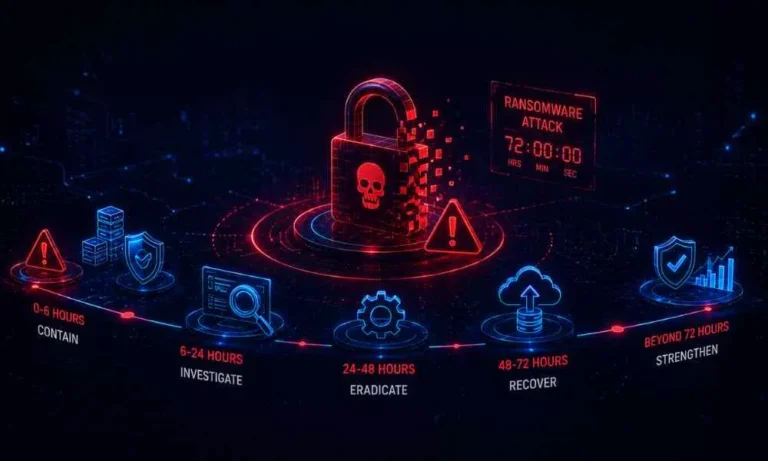
Ransomware response is both a business crisis and a technical incident. Encryption may be only one part of the attack. Threat actors can also steal data, create accounts, disable security tools, alter backups, or retain access for later use. The first 72 hours should focus on containment, investigation, and controlled recovery, not simply getting every device online again.
A controlled recovery environment can help teams investigate suspicious data before reconnecting it to production. Cohesity is a data security and cyber resilience provider with backup, recovery, and incident-response capabilities. Its guidance for clean room recovery after a cyberattack describes using an isolated environment to investigate malware, identify clean recovery points, and restore systems with less risk of reinfection.
Why the First 72 Hours Matter
Table of Contents
Early choices can affect downtime, legal obligations, evidence quality, and the likelihood of a repeat compromise. A rushed wipe can remove useful forensic information. An unverified restore can reintroduce malware. A poorly coordinated message can create confusion for employees, customers, and partners. Establish a measured process immediately, then adjust it as confirmed facts emerge.
Hour Zero: Confirm the Incident and Set One Leader
When employees report encrypted files, unavailable systems, unusual logins, or a ransom message, designate an incident lead with authority to coordinate decisions. Assign another person to maintain a time-stamped activity log. Move urgent coordination to trusted phones or an unaffected messaging platform, and instruct staff not to delete files, click links in ransom notes, or contact the attacker.
- Notify internal security and IT leaders, external incident responders, legal counsel, and the cyber insurer.
- Record what was discovered, when it was discovered, and which systems may be affected.
- Identify safe communication channels and an approved spokesperson.
Hours One to Four: Contain the Spread
Containment should limit attacker movement while protecting evidence. Disconnect affected endpoints from wired and wireless networks. If multiple systems show signs of compromise, isolate the relevant network segments. Pause backup replication or cloud synchronization when there is a reasonable risk that encrypted or malicious changes could spread to protected copies.
- Secure backup consoles, storage platforms, and privileged credentials.
- Disable suspicious remote-access paths with qualified technical support.
- Review newly created accounts, unusual administrator activity, and failed login patterns.
- Decide whether to power down systems only after considering the value of volatile evidence and available forensic expertise.
Hours Four to Twelve: Preserve Evidence and Find the Entry Point
Collect and protect the information needed to understand the event’s scope. Preserve ransom notes, endpoint alerts, firewall logs, identity records, cloud audit logs, backup-job changes, and evidence of unusual data transfers. When feasible, responders may collect system images or memory captures before rebuilding affected devices.
The encryption event does not necessarily reveal when or how access began. Common access paths include stolen credentials, phishing, exposed remote services, unpatched software, and third-party access. The goal is to identify the likely entry point, attacker persistence, affected accounts, and any signs that confidential data was accessed or removed.
Hours Twelve to Twenty-Four: Set Recovery Priorities
Prioritize systems by operational impact, not convenience. A practical sequence is:
- Health, safety, and emergency functions.
- Identity, authentication, and access-control services.
- Revenue-producing applications and transaction systems.
- Customer, employee, and communication services.
- Internal tools and lower-priority workloads.
Recovery time objectives define how quickly a service should be restored. Recovery point objectives define how much data loss may be acceptable. These targets give leadership a common basis for deciding which systems require the fastest recovery and which backup versions should be evaluated first.
Day Two: Build a Safe Recovery Path
Do not return affected workloads directly to production. Start with known-clean infrastructure, trusted installation media, restricted access, and a documented testing process. Rebuild systems as necessary, reset privileged credentials on a clean device, patch the vulnerability that enabled access, and restore services one at a time while monitoring for suspicious activity.
Verify the age, integrity, and safety of backup data before restoration. An isolated recovery network can separate investigation from normal business operations and give responders time to validate applications, identities, and data before systems reconnect. Federal ransomware response guidance also emphasizes containment, investigation, recovery planning, and the use of tested backups.
Day Two to Day Three: Coordinate Legal, Insurance, and Communications
Technical recovery needs parallel oversight. Notify the cyber insurer promptly and follow policy requirements. Ask legal counsel to assess regulatory, contractual, and notification duties, especially if personal or confidential data may have been accessed. Keep executives informed with confirmed facts, current risks, and unresolved questions.
Maintain a record of major decisions, expenses, communications, and restoration milestones. Reporting and notification requirements vary by jurisdiction, industry, and incident details, so legal advice should guide deadlines and public statements. The NIST ransomware risk management profile can also help organizations connect incident actions to longer-term governance, detection, response, and recovery practices.
Should a Business Pay the Ransom?
There is no universal answer. Payment does not guarantee a working decryptor, deletion of stolen data, or removal of attacker access. Decision-makers should consider whether verified backups exist, whether data was stolen, whether sanctions or legal concerns apply, what law enforcement and counsel advise, what the insurance policy requires, and whether the organization can operate during recovery.
Common Mistakes That Slow Recovery
- Reconnecting systems because they appear unaffected.
- Restoring every backup before investigating indicators of compromise.
- Wiping devices before preserving evidence.
- Using potentially compromised email for sensitive response discussions.
- Resetting only one password while other privileged accounts remain exposed.
- Making public claims before facts are verified.
After Recovery: Turn the Incident Into a Stronger Plan
Recovery is not complete when systems are available again. Hold a lessons-learned review within two weeks, document the access path and attacker activity, strengthen identity controls and multifactor authentication, and test restoration procedures on a recurring schedule. Update contact lists, escalation paths, and communication templates, and then run a ransomware tabletop exercise to test the revised plan.
Conclusion: Recovery Works Best When It Is Deliberate
Speed matters during ransomware, but controlled action matters more. Organizations that isolate systems, preserve evidence, protect backups, validate clean recovery points, and restore essential services in a planned order are better positioned to reduce disruption and rebuild trust. A written plan is valuable. Regular testing is what makes that plan dependable when a real incident occurs.